How it works
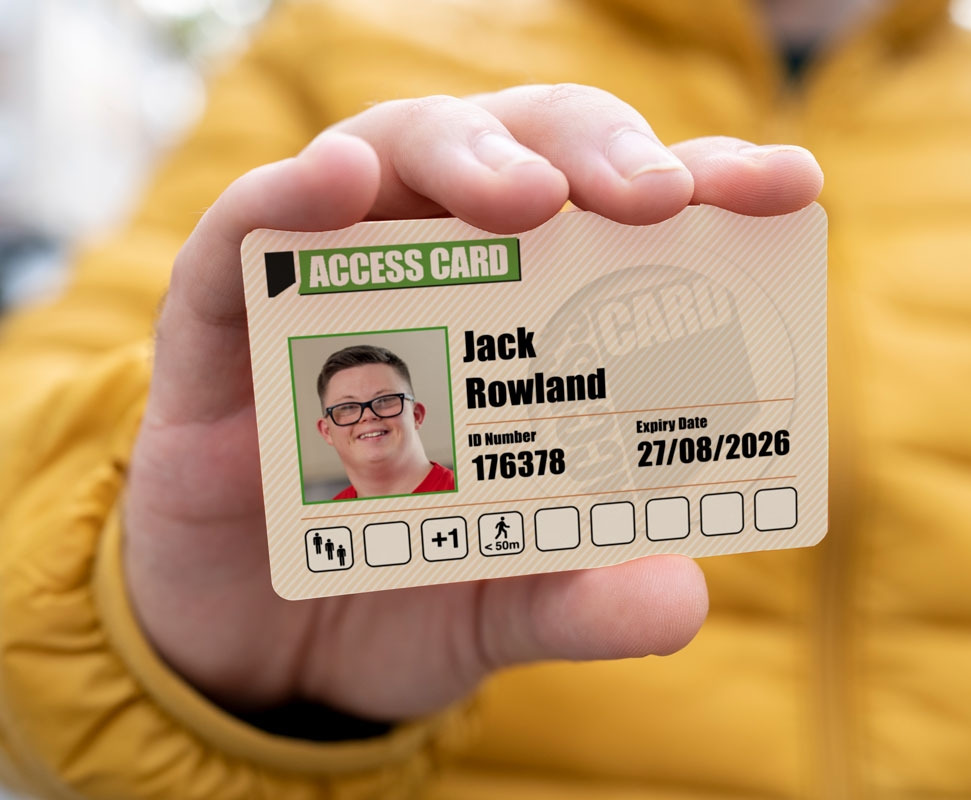
Designed to streamline the process of communicating your access needs, the Access Card translates your disability or impairment into easy-to-understand symbols. This section explains how you can use the card to convey your access requirements to venues and service providers, ensuring a more accessible and enjoyable experience wherever you go.
In addition to translating your needs into symbols, the Access Card serves as a recognised proof of your requirements, eliminating the need for repeated explanations at different venues. This recognition is crucial in building a more inclusive environment, as it encourages venues and service providers to be proactive in their accessibility efforts. The card not only supports your individual needs but also contributes to a broader movement towards better accessibility for all.
The Access Card costs £15 for 3 years. For more information about the free Digital Access Pass, see below.
The symbols
On the front of your Access Card, there are 9 spaces to display symbols used to highlight the barriers you face and the reasonable adjustments you might need. Here's a description of each one of the symbols:
- Difficulty Standing
- This symbol is allocated to people who have a physical mobility impairment that makes standing for long periods difficult or impossible.
- Difficulty with Crowds
- This symbol is allocated to people who find crowded environments or queues overwhelming or distressing, often due to neurodivergence or mental health conditions.
- Level access
- For people who require wheelchair accessible facilities or have to have level access as they are unable to make even a few steps.
- We do not add the standing and queuing symbol for wheelchair users as if a queue is accessible this should present no problems. If a queue is not accessible then this will be addressed by each venue as an adjustment related to the need for level access.
- Distance
- If you have difficulty moving yourself more than short distances this is the symbol for you. We have no strict definition of what distances are involved as it will be for you to discuss this with providers, who will let you know how they can meet your needs. We do however need to see information that confirms you have a medical condition that has a significant impact on the distance you can move.
- Urgent Toilet Needs
- All Access Card holders have access to accessible toilets.
- For people with continence issues, we have the W.C. Symbol. Providers on board are made aware that this means urgent access to any toilet without question. This might be an accessible toilet, it might not.
- This is unlikely to include emotional support animals. If you require an emotional support animal, we recommend you take advantage of the support provided by an essential companion which may covered by our +1 symbol.
- Essential Companions
- This symbol is awarded to people for whom it would be significantly difficult to access services without support from another person.
- You must be able to show that the support you need is substantial, significant or frequent, and directly related to your needs as a disabled person, and that without extra support you would receive a lesser service.
- It may mean an essential companion ticket, or it may mean a provider will offer additional support from their own staff.
- The support needed must exceed what could be reasonably expected of family/friends already accompanying you, and must be due to disability-related needs.
- For children, we do not question that your child may need a certain amount of support when out and about, but we are unlikely to award the +1 symbol where they would already be in direct supervision and guidance by a parent or other family member.
- Visual information
- For people who find accessing visual information a barrier.
- This may include people with visual impairments who require alternative formats or guidance.
- Audible Information
- For people who have difficulty accessing or processing audible information.
- It may be relevant to deaf people or those with hearing impairments.
- Miscellaneous
- This category is for everything thing else, and providers are encouraged to seek more information directly from you about how they might be able to support any needs not covered by the other symbols.
- For example, photo-sensitive epilepsy.
- This symbol will trigger a provider to ask for specific information from you about how you will access their service.
3rd Party Registrations (Digital Access Passes / DAPs)
Nimbus, the multi-award winning company behind the Access Card has been incredibly passionate about making sure that accessibility is never put behind a paywall and, whilst we obviously think that the Access Card is great value and at £15 for 3 years, believe that all providers should have a free registration process.
As the team at Nimbus is recognised as the experts in access registration, many of these providers choose to subcontract this decision-making process to the same team that runs the Access Card.
When you join a free registration scheme you will receive a Digital Access Pass number you can use to unlock your access requirements at the participating venue that you apply through, but you don't receive a card.
You can find the free registration schemes for providers by visiting their Directory listing in the Find a Provider directory.